- C 60.6%
- C++ 39.1%
- Assembly 0.3%
| Filename | Latest commit message | Latest commit date |
|---|---|---|
| buildEnvironment | ||
| source | ||
| workspace | ||
| .gitattributes | ||
| .gitignore | ||
| LICENSE | ||
| README.md | ||

Anycubic Kobra Plus Firmware 2.8.6 (LIN_ADVANCE enabled & disabled)
Hc32f460kct6 Marlin - Forked from https://github.com/ANYCUBIC-3D/Kobra_Plus
Download builds from releases section
Build Info
-
First of all, download and install Keil v5.36, do not install v5.37 as it doesn't ship with ARM Compiler v5.06 -> MDK536.EXE / alternative external download
-
Install the software as you would install any software and open it
-
The Pack Installer will open and start installing default packages (the progress bar is at the bottom right) . In the future if you want to open the Pack Installer it is located under Project -> Manage -> Pack Installer...
-
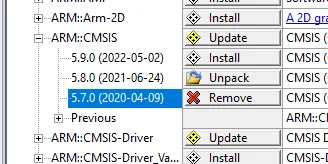
Once the default packages are installed, in the Pack tab on the right, find and install ARM::CMSIS 5.7.0 (2020-04-09) and uninstall the 5.8.0 version
-
Now, download and install HDSC.HC32F460 v1.0.7 -> HDSC.HC32F460.1.0.7.pack / alternative external download
-
Once the installation is done, you can close the Pack Installer and open Keil µVision 5
-
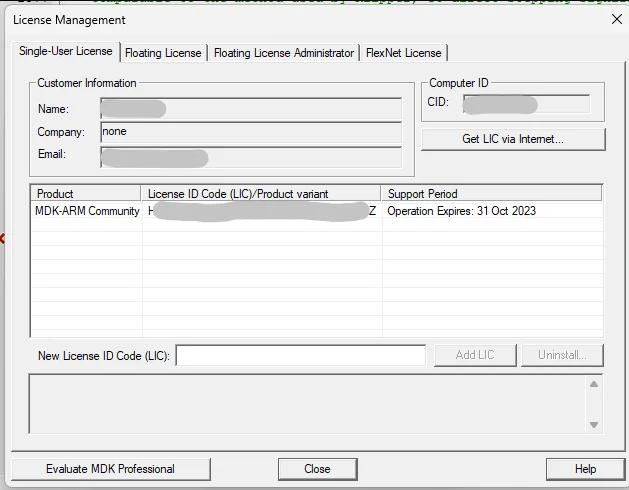
Go to File -> License Management...
-
Click on Get LIC via Internet... and click OK
-
On the next page, enter this code in Product Serial # (PSN) -> 42B2L-JM9GY-LHN8C
-
Enter a PC Description, a First Name, a Last Name, an E-mail, your country and your phone (everything else should be optionnal). The E-mail will be used to send you your activation code so make sure to input a real E-mail!
-
Press Submit on the bottom and wait to receive the E-mail
-
In the E-mail you will get a License ID Code (LIC), copy that code and go back to Licence Management in µVision
-
Paste the LIC in the New License ID Code (LIC) input and press Add LIC
-
Close the License Management tab and go to Project -> Open Project...
-
Open the anycubic.uvprojx file located in the workspace folder of the Anycubic source code (download it from Github)
-
You shouldn't have any error / message in the Build Output tab on the bottom, if it stays empty then it's good
-
To build, go to Project -> Build target
-
The output file will be located under workspace/firmware.bin